Documentation
DDNS
Home and office broadband typically comes with a dynamic public IP that changes without notice. DDNS keeps a fixed domain pointed at the machine’s current IP — clients and other servers only need to remember the name, never the address.
How it works
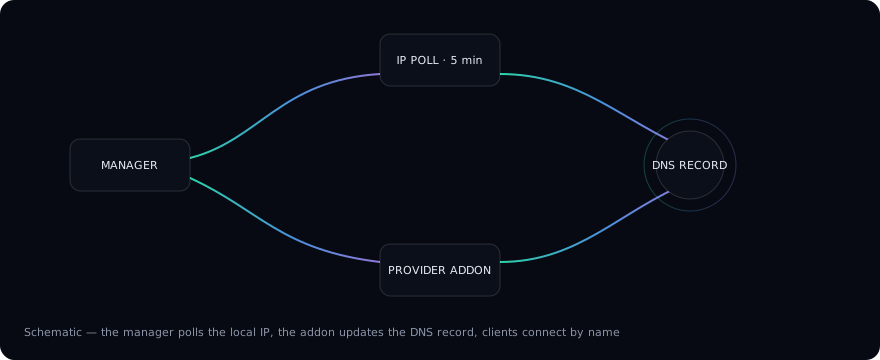
The whole pipeline runs automatically in the server background:
- DDNS manager refreshes on a fixed cycle (every 5 minutes by default, adjustable via the
TERMINAL_SERVER_DDNS_POLL_INTERVAL_SECSenvironment variable); saving the configuration triggers an immediate refresh, and nothing runs while the service is disabled; - Local IP detection reads the selected network interface first, falling back to route-based discovery, and filters the result by the
IP Familysetting (IPv4 / IPv6 / dual); - DDNS addon — a sandboxed JS script — receives the decrypted config and the current IP and calls the DNS provider’s API over HTTP. The builtin Cloudflare addon, for example, looks up the zone by domain and rewrites the A / AAAA records to the current IP, deleting stale records when an address family disappears;
- Clients resolve the domain to the latest IP and connect by name.
Configuration
Open the DDNS section of the Web UI:
- Turn on
Enable. You can also leave the service off while filling everything in — a disabled service saves its configuration but never runs; - Pick a provider under
Provider;Cloudflare DDNSis built in; - Fill in the provider fields (Cloudflare example):
Email— the Cloudflare account email;API Token— a token with Zone → DNS → Edit permission;Domain— the zone root domain, e.g.example.com;Subdomain— the record name under the zone, e.g.subforsub.example.com; leave empty for the zone root;
- In
Network Interface & IP, choose theInterfaceandIP Family.Dual Stackrequires the interface to have both an IPv4 and an IPv6 address; - Click
Save, thenSync Nowto verify.Sync Statusshows the last IP pushed and the sync time, along with the addon’s error message on failure.
Security
Provider credentials (API tokens) are encrypted before being stored (enc-v2:) and only decrypted in memory while the addon runs; addons execute in a sandboxed JS runtime with outbound HTTP as their only capability.
Extending providers
Providers are addons: a JSON manifest (declaring the config fields the Web UI turns into a form) plus a JS script exposing run(). The builtin cloudflare-ddns is the reference implementation — custom providers can be uploaded as a zip in the Addons section.
Working with other features
- Once the domain resolves, the
Serversection’s QR code can switchConnection TypetoDDNS Domain, so clients scan a domain connection; - Other servers can put
wss://your-domain:portinto theirRelay Addressto run the relay chain over the domain (see the Relay chapter).