Documentation
Upload & Download
File transfers between your machine and the server are drag & drop, and the direction is the meaning: drag in = upload to the server, drag out = download to this machine. Transfers ride the encrypted client-server connection; remote and shared servers behave like local ones.
Uploading: drag in
Drag files (or whole folders) from your OS file manager onto the file list and release:
- In tree mode, dropping on a folder row uploads into that folder; dropping at the root (the insertion line between rows) uploads into the current root directory;
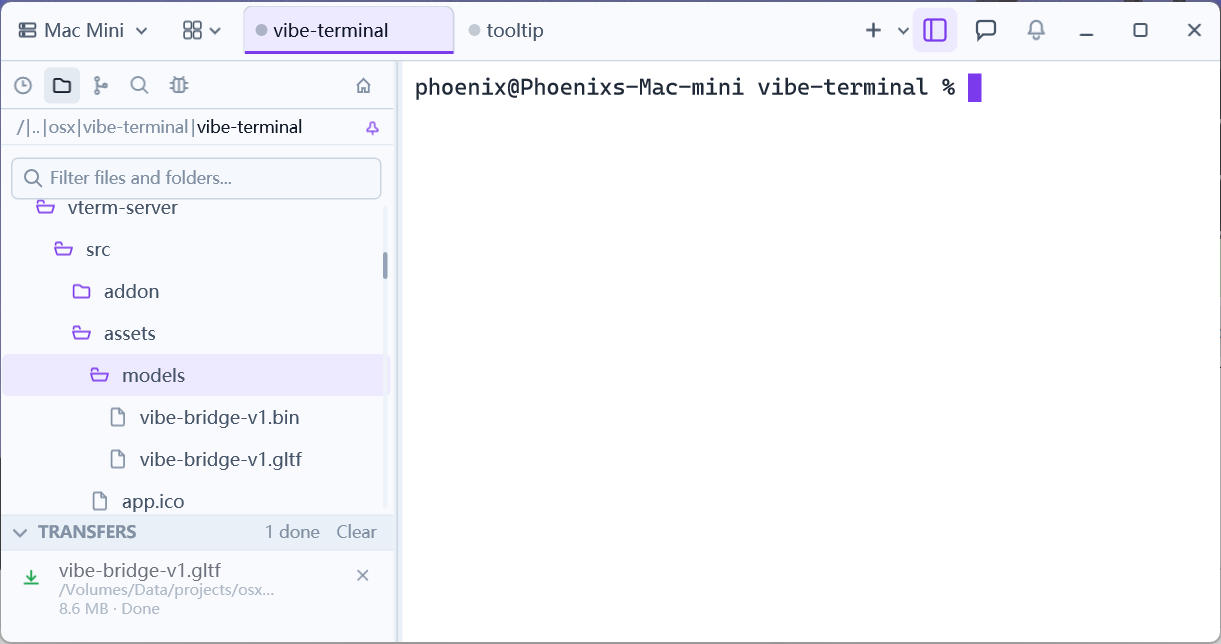
- A transfer row appears at the bottom of the list showing
Uploading, the file name, and a progress bar; - Completion shows
Uploaded n file(s); failures include the reason (e.g. permission denied) and the list refreshes to reveal the new files.
Downloading: drag out
Press a file in the list, drag it out of the client window, and drop it into your OS file manager (or the desktop):
- The file streams down from the server to where you dropped it;
- Transfer rows show progress the same way; a finished download row is clickable and opens the local download folder;
- Multi-select and drag several files at once.
Drag & drop moves single files between this machine and one server; to move data between two servers, combine Host with HTTP Server or terminal commands (scp/rsync).