Documentation
Overview
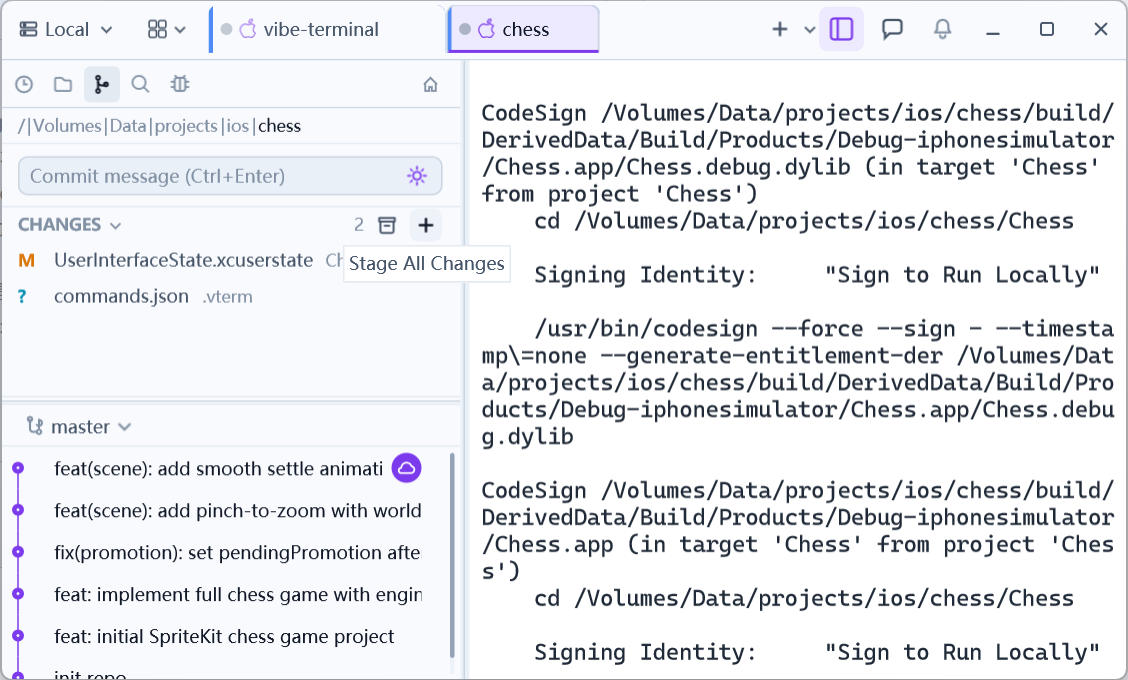
The Git panel builds version control into the client: stage, commit, manage branches, worktrees, interactive rebase, conflict resolution, and pushing — without leaving your terminal window. Everything operates on the Git repository of the current terminal session: whichever directory the session runs in is the repository the panel shows.
Opening it
Click the Git tab in the left activity bar (repository data appears only when the active session is inside a Git repository). A tab’s repository follows its active session; repository breadcrumbs let you hop between parent and child repositories, and submodules are listed separately.
What it can do
- Staging & committing — per-file or bulk stage/unstage, discard changes, commit with a message, AI-generated commit messages (see LLM Assistance);
- History — commit history and per-file history, compare and revert between revisions;
- Branches — checkout, create, and delete local/remote branches and tags;
- Worktrees — check a branch out into an isolated working tree (a new terminal tab opens automatically), merge it back when done (see Worktrees);
- Interactive rebase — visually reorder/squash/edit the commit queue with conflict resolution (see Interactive Rebase);
- Conflict resolution — a merge editor with four modes, including an AI agent that resolves hunks one by one (see Resolving Conflicts);
- Push & misc — a full-featured push dialog, stashes, detached-HEAD handling (see Push, Checkout & More).
The following pages cover each area in that order.